

Mesh Wi-Fi - Our software makes all the difference.
eero’s patented TrueMesh® software works seamlessly with TrueRoam and TrueChannel to ensure your devices are always connected to the strongest signal.
What makes eero, eero.

Lightning Fast Wi-Fi 7 Speeds Everywhere.
+Every eero is designed with one speed in mind: fast. Combined with our patented TrueMesh® technology and finely tuned antennas, your devices get consistently strong speed and coverage.
Learn More

Connectivity You Can Count On.
+TrueMesh® optimises for the ideal connection and continually monitors the network to proactively fix issues before they become noticeable.
Learn More

Simple to Set Up, Simple to Manage.
+eero is designed to be easy from start to finish—with app-guided setup, automatic updates, and Amazon Frustration-Free Setup, which allows you to connect compatible smart devices in seconds (requires account linking).
Learn More

Stay Secure With Advanced Controls.
+Every eero comes with the latest in Wi-Fi encryption. And with eero Plus, you'll gain access to parental controls and active threat protection to help protect against ad trackers, malware, phishing, and viruses.
Learn More

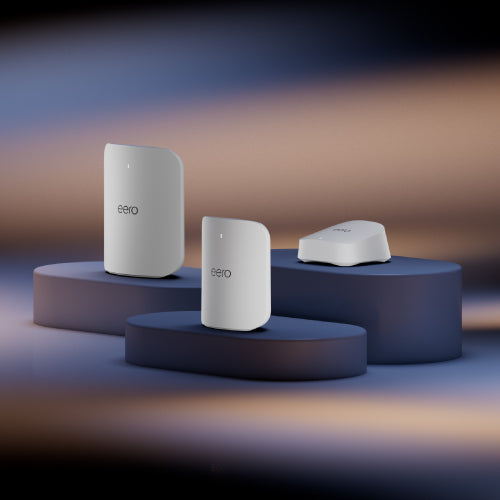
Step Into the Future of Wi-Fi 7 in Singapore
Upgrade to next-gen Wi-Fi mesh routers designed for modern homes. Enjoy smooth 4K streaming, ultra-low latency gaming, and robust multi-device support with the latest Wi-Fi 7 standard. If you’re searching for a Wi-Fi router Singapore homeowners can trust, eero makes it simple to stay connected.
Learn More

“Best Whole-Home Mesh Wi-Fi System”
Whatever Your Wi-Fi Needs, There’s an eero for That.
Shop All Models


Local Support & Warranty in Singapore
Every eero mesh Wi-Fi router in Singapore comes with:

30-day returns

Free support

Free shipping

3-year warranty
Frequently Asked Questions About Mesh Wi-Fi Routers
What is a mesh Wi-Fi router and how does it work?
+A mesh Wi-Fi router is designed to replace patchy signals with seamless coverage. Instead of relying on one central router, a mesh system uses multiple nodes placed around your home. These nodes work together to create a single, unified network, so your devices always connect to the strongest signal. With eero’s TrueMesh® technology, traffic is routed intelligently to keep your Wi-Fi reliable and consistent — even when everyone’s online at the same time.
Which eero router is best for an HDB flat or condo in Singapore?
+For most HDB flats, smaller condominiums, and other small space Wi-Fi setups, the eero 7 offers excellent coverage and Wi-Fi 7 speeds at an affordable price. If you have a larger condo or need extra performance for multiple devices, the eero Pro 7 is ideal. For landed houses, bigger apartments, or households that demand the very best speeds and range, the eero Max 7 is the top choice.
Can I use eero with Singtel, StarHub, or M1 broadband?
+Yes, all eero mesh Wi-Fi routers in Singapore are fully compatible with local ISPs, including Singtel, StarHub, and M1. Simply connect your eero router to the existing modem provided by your service provider, and you’ll be up and running in minutes.
Is setup simple or do I need a technician?
+You don’t need a technician — setting up an eero mesh Wi-Fi router is straightforward. The eero app guides you step by step, from plugging in your devices to creating your home Wi-Fi system. In less than 10 minutes, you’ll have a secure network that’s ready to use.
Where can I buy eero mesh Wi-Fi routers in Singapore?
+You can buy directly from the official eero Store Singapore, ensuring authentic products, local warranty, and fast delivery. eero mesh Wi-Fi systems are also available through selected retail and online partners such as Amazon, Shopee, and Lazada, but shopping directly gives you the added benefit of official support and 30-day returns.
How much does a Wi-Fi system cost?
+The price depends on the model and coverage you need. The eero 7 is a cost-effective entry point for smaller spaces, while the eero Pro 7 suits medium-sized homes. The eero Max 7, our fastest and most advanced option, functions as a 10 Gbps wireless router for high-bandwidth households, designed for large houses or heavy users. Each system is available in single units or multi-packs, so you can choose a setup that fits your budget and home size. See all mesh Wi-Fi routers in Singapore and their prices at the official eero Singapore store.
What makes eero better than a traditional Wi-Fi router in Singapore?
+Traditional routers often struggle with coverage, leaving dead zones in bedrooms, kitchens, or balconies. An eero mesh Wi-Fi router solves this by spreading coverage evenly across your home. With features like TrueMesh®, automatic updates, and easy app controls, eero is more reliable, more secure, and much simpler to manage than standard routers.
What warranty and support do I get in Singapore?
+Every eero mesh Wi-Fi system purchased in Singapore comes with a 3-year warranty, 30-day returns, free shipping, and ongoing local support. This means peace of mind when investing in your home Wi-Fi system in Singapore, knowing help is available whenever you need it.
How many eeros do I need?
+Every home is different, and eero was designed to be flexible so it works for all kinds of spaces — from HDB flats to larger landed homes. The number of units you need depends on the size of your home, the number of Wi-Fi users, your internet speed plan, and your devices. Smaller flats may only need one unit, while larger spaces often benefit from two or more.
To find the best setup for your home, you can contact our local support team in Singapore for tailored recommendations based on your space and broadband provider.
Why does my network seem slow?
+We know slow Wi-Fi can be frustrating. Here are some quick checks you can try:
- Check your devices: If only one device is slow, try toggling its Wi-Fi off and on again, or rebooting it.
- Check your speed: You can run a speed test directly in the eero app — just tap Internet, then Speed Test, to check your network performance. Compare results with the speeds you pay for from your ISP.
- Power cycle your eeros: Unplug your eero, wait 30 seconds, then plug it back in.
- Restart your modem: Sometimes a simple restart can fix performance issues.
- Check for double NAT: If you have another router or a modem/router combo in use, it may be interfering. Put it in bridge mode or connect your eero directly.
- Choosing a selection results in a full page refresh.